A performant, full-stack blog starter kit built with Next.js 15, MDX, and Tailwind CSS — forked from enji.dev and heavily customized.

✨ Live Demo: www.qladgk.com ✨




- ⚡ Next.js 15 + React 19 — blazing fast performance with the latest React
- 📝 MDX-first — write posts in Markdown, embed React components anywhere
- 🎨 Tailwind CSS — fully responsive, class-based dark mode, accent color system
- 📊 Built-in analytics — page views, shares, and emoji reactions (CLAP/THINK/AMAZED)
- 🔍 SEO optimized — auto-generated sitemap, RSS feed, dynamic OG images via
@vercel/og - 📖 Series support — group posts into series with navigation and custom metadata
- 💬 Comments — Twikoo integration for privacy-friendly commenting
- 🐳 Docker ready — one-command deploy with blue-green zero-downtime updates
- 🌍 i18n ready — bilingual content support out of the box
- 🎬 Framer Motion — smooth page transitions and animations
| gkBlog | Hexo / Hugo | WordPress | |
|---|---|---|---|
| Framework | Next.js 15 + React | Static generator | PHP |
| Content | MDX (Markdown + React) | Markdown | WYSIWYG |
| Hosting | Vercel (free) | GitHub Pages | VPS / managed |
| Customization | Full React component system | Theme templating | Plugin ecosystem |
| Performance | ⚡ SSG + ISR | ⚡ Static | 🐢 Server-rendered |
| DX | TypeScript, hot reload | CLI, YAML config | Admin panel |
| Best for | Devs who want full control | Simple blogs | Non-technical users |
- Frontend: Next.js 15, React 19, TypeScript
- Styling: Tailwind CSS 3,
tailwindcss-accent, Framer Motion - Content: MDX with custom remark/rehype plugins (KaTeX math, Prism syntax highlighting)
- Database: MongoDB (free tier) via Prisma ORM — stores view/share/reaction metadata
- Deployment: Vercel, Docker, or Node.js 22+
flowchart TB
    classDef roundedCorners stroke-width:2px,rx:10,ry:10

    subgraph "Frontend"
        UI["Tailwind CSS UI"]
        Components["React Components"]
        Pages["Next.js Pages"]
        Hooks["Custom Hooks"]
        Providers["State Providers"]
    end

    subgraph "Content"
        MDX["MDX Files"]
        Assets["Static Assets"]
    end

    subgraph "Data"
        MongoDB["MongoDB — Content Metadata"]
        LocalFiles["Local Files — Post Content"]
    end

    subgraph "Deploy"
        Vercel["Vercel"]
        Docker["Docker"]
        Nodejs["Node.js"]
    end

    class UI,Components,Pages,Hooks,Providers,MDX,Assets,MongoDB,LocalFiles,Vercel,Docker,Nodejs roundedCorners;

    UI --> Components --> Pages
    Hooks --> Components
    Providers --> Components
    MDX --> Pages
    Assets --> Pages
    Pages --> MongoDB
    Pages --> LocalFiles
    MongoDB --> Vercel
    LocalFiles --> Vercel
    MongoDB --> Docker
    LocalFiles --> Docker
    MongoDB --> Nodejs
    LocalFiles --> Nodejs
Prerequisites: pnpm (recommended), Node.js 22+
git clone https://github.com/<your-username>/gkBlog.git
cd gkBlogcp ./apps/gkBlog/.env.example ./apps/gkBlog/.env.localEdit .env.local:
# Required: MongoDB connection string (free tier works)
DATABASE_URL = mongodb+srv://<user>:<password>@<cluster>/<db>?retryWrites=true&w=majority

# Required: any random string for session hashing
SALT_IP_ADDRESS = your-random-secret

# Optional: analytics integrations
NEXT_PUBLIC_BAIDU_TONGJI = xxxxxxxxxxxxxx    # Baidu Analytics
NEXT_PUBLIC_GOOGLE_ID = xxxxxxxxxxxxxx        # Google Analytics
NEXT_PUBLIC_CLARITY_TAG_ID = xxxxxxxxxxxxxx   # Microsoft Clarity
NEXT_PUBLIC_TWIKOO_ENVID = xxxxxxxxxxxxxx # Twikoo Commentspnpm install
pnpm devYour blog is running at http://localhost:3000! 🎉
mkdir -p apps/gkBlog/src/pages/blog/my-first-postCreate apps/gkBlog/src/pages/blog/my-first-post/index.mdx:
---
title: Hello World
description: "My first blog post with gkBlog"
date: "2024-01-01"
lang: en
tags:
  - nextjs
  - blog
category: Tech
cover: https://your-cdn.com/cover-image.png
---

## Welcome to my blog!

This is written in **Markdown** with full React component support.| Field | Type | Required | Description |
|---|---|---|---|
title |
string | ✅ | Post title |
description |
string | ✅ | SEO description & preview text |
date |
string | ✅ | Publication date (YYYY-MM-DD) |
lang |
zh | en |
✅ | Language |
tags |
string[] | — | Tag list |
category |
string | — | Category name |
cover |
string | — | Cover image URL (CDN recommended) |
series |
string | — | Series name for grouping posts |
seriesOrder |
number | — | Order within the series |
One click. Auto-deploys on every push to main.
docker compose build
docker compose up -d
Blue-green deploy for zero downtime:
docker compose -f docker-compose-blue.yml pull
docker compose -f docker-compose-blue.yml up -d
# Verify blue is healthy, then switch traffic
docker compose -f docker-compose-green.yml pausepnpm install
pnpm build
pnpm start---
title: Building a Static Blog with Next.js
description: "A complete guide to building a static blog with Next.js, MDX, and Tailwind CSS."
date: "2024-10-18"
lang: zh
tags:
- nextjs
- tutorial
category: Tech Notes
cover: images/20250422153424876.png
---Use a CDN (e.g., Alibaba Cloud OSS) with PicGo for one-click uploads. All images in cover fields should point to CDN URLs.
- Mermaid diagrams: mermaid.live
- Cover generator: picprose.pixpark.net
- Hand-drawn diagrams: excalidraw.com
- Image compression: picsmaller.com
- Primary: github.com/qlAD/gkBlog
- Mirror (CN): git.qladgk.com/qlAD/gkBlog
- Mirror (Gitee): gitee.com/qlAD/gkBlog
See CONTRIBUTING.md for setup instructions and guidelines.
Contributors
If you find this project useful, please consider giving it a ⭐ — it helps others discover it!
MIT License — feel free to use, modify, and share.
| Variable | Description | How to Get |
|---|---|---|
DATABASE_URL |
MongoDB connection string | MongoDB Atlas (free tier) |
SALT_IP_ADDRESS |
Salt for session ID hashing | Any random string you choose |
NEXT_PUBLIC_BAIDU_TONGJI |
Baidu Analytics ID | tongji.baidu.com |
NEXT_PUBLIC_GOOGLE_ID |
Google Analytics ID | analytics.google.com |
NEXT_PUBLIC_CLARITY_TAG_ID |
Microsoft Clarity ID | clarity.microsoft.com |
NEXT_PUBLIC_TWIKOO_ENVID |
Twikoo Comment System Env ID | twikoo.js.org |
BAIDU_API_URL |
Baidu Search API URL | ziyuan.baidu.com |
BING_API_KEY |
Bing IndexNow API Key | bing.com/indexnow |
ALIYUN_REGISTRY |
Alibaba Cloud Container Registry | cr.console.aliyun.com |
DOCKER_USERNAME |
Docker registry username | Alibaba Cloud CR credentials |
DOCKER_PASSWORD |
Docker registry password | Alibaba Cloud CR credentials |
NEODB_ACCESS_TOKEN |
NeoDB Access Token | neodb.social/developer |
🌐 使用 Turborepo 和 pnpm 构建的博客网站,基于 enji.dev 主题二次开发
✨在线预览:https://www.qladgk.com ✨
gkBlog 系统采用现代化的全栈技术架构,具体如下:
- 前端:使用 Next.js、React 和 TypeScript 构建用户界面,确保应用的高性能和开发效率。
- 样式:采用 Tailwind CSS 框架,实现灵活且响应式的样式管理。
- 内容:支持 MDX 格式,便于内容创作和富文本编辑。
- 数据库:使用在线版 MongoDB 存储文章元数据,而文章内容则存储在本地项目目录中。
- 部署:支持通过 Vercel 或 Node.js 环境进行部署,也可以生成 Docker 镜像。
📝 有关更多流程图见: 项目流程图
首先,我建议安装 pnpm,因为它是此项目中使用的包管理器。
-
Fork 本项目,然后将其克隆到本地机器:
git clone <your-fork> cd ./gkBlog
-
准备好对
.env.local文件进行配置:cp ./apps/gkBlog/.env.example ./apps/gkBlog/.env.local
DATABASE_URL = your-database-connection-string SALT_IP_ADDRESS = super-secret NEXT_PUBLIC_BAIDU_TONGJI = xxxxxxxxxxxxxx NEXT_PUBLIC_GOOGLE_ID = xxxxxxxxxxxxxx NEXT_PUBLIC_CLARITY_TAG_ID = xxxxxxxxxxxxxx NEXT_PUBLIC_TWIKOO_ENVID = xxxxxxxxxxxxxx
📝 对于
DATABASE_URL,请使用您的数据库连接字符串。我个人使用的是免费版的 MongoDB,你也可以在免费版中创建数据库,并在env.local中添加连接字符串。它看起来应该如下所示:mongodb+srv://<username>:<password>@<cluster-url>/<database>?retryWrites=true&w=majority&appName=<app-name>🗝️ 至于
SALT_IP_ADDRESS,你可以随意填写一些你的密码。它的作用是用于加密数据库处理。 -
配置完成后,仍然在项目根目录下安装所需的依赖项:
pnpm install
-
最后,运行项目:
pnpm dev
现在,你的项目应该已经启动并顺利运行了!🎉
-
支持 Vercel 一键部署(海外用户推荐)
-
使用 Docker 部署(国内服务器推荐)
docker compose build docker compose up -d
-
支持 Node.js 环境部署
pnpm install
pnpm build
pnpm start
-
Vercel:随着 GitHub 仓库的更新自动部署。
-
国内服务器:采用 Docker 蓝绿部署,具体命令如下: 假设当前运行的是 Green:3000,此时需要更新 Blue:3001
docker compose -f docker-compose-blue.yml pull # 给 blue 容器拉取最新镜像
docker compose -f docker-compose-blue.yml up -d # 运行 blue 容器
然后检查
ip:30001后无问题切换流量到3001docker compose -f docker-compose-green.yml pause # 先停止 green 容器过一段时间后发现 Blue 无问题就可停止或删除 Green,反之恢复 Green 后切换流量。
- 自建 Git 服务器:https://git.qladgk.com/qlAD/gkBlog
- 国内码云:https://gitee.com/qlAD/gkBlog
- 国内:阿里云 Docker 容器、ESA https://www.qladgk.com
- 国外:Vercel https://gkblog.vercel.app
---
title: Next.js 静态博客搭建指南 - 从架构设计到部署上线
description: "详细解析如何使用 Next.js 搭建静态博客,包括技术选型对比(Hexo/Hugo/WordPress)、MDX 内容管理、Twikoo 评论系统集成和 Serverless 部署方案。"
date: "2024-10-18"
lang: zh
tags:
  - nextjs
  - 环境配置
category: 技术笔记
cover: images/20250422153424876.png
---- 阿里云 OSS 自建图床,使用 PicGo 客户端上传图片。
- 或者使用阿里云官方提供工具 OSS-Browser https://help.aliyun.com/zh/oss/developer-reference/use-ossbrowser
-
Mermaid 流程图:使用在线 Mermaid 生成工具:https://mermaid.live/edit
-
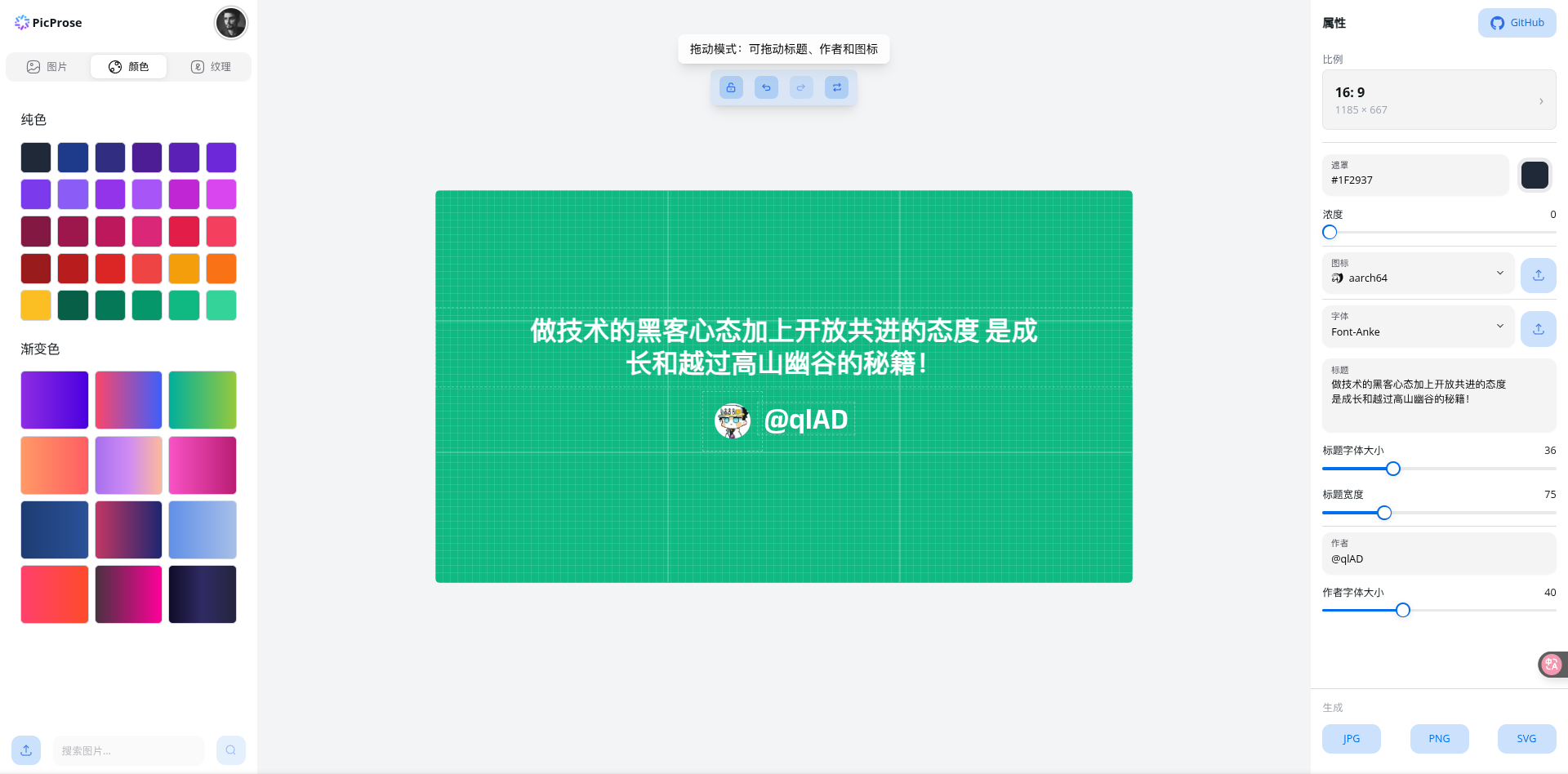
封面/缩略图:在线图片生成器:https://picprose.pixpark.net/zh ,设计布局如下:
-
手绘风格图:使用在线 excalidraw 绘图工具:https://excalidraw.com/
- 图片压缩工具:图小小 https://picsmaller.com/
对于那些想要贡献代码的人,请参阅 贡献指南。
贡献者名单
本仓库遵循 MIT License 开源协议,请在使用前仔细阅读,欢迎您的使用和贡献。